Building a Tiny Guestbook App with Rust and Scratch Containers
I had some guests coming to stay and one of them is a fellow self-hoster. I thought it'd be fun to throw a guestbook app on the homelab so people could leave reviews of their stay. This led to the creation of tiny-guestbook.
Given the 'for fun' nature of the app I thought it'd be a good excuse to try and make the image small, these days I see many bloated containers and I find joy in trying to remove absolutely anything that is not needed from mine. I decided on Rust because it's fun but also because it is easy to make statically linked binaries, this is perfect for this application as it lets us use the scratch base "image" from Docker. I use quotes because scratch isn't really an image, it's technically a no-op which doesn't bring any files into your container, it doesn't even create a layer.
This post covers how the app works at a high level and then goes deeper on the Dockerfile, multi-arch builds, and what it takes to run on FROM scratch.
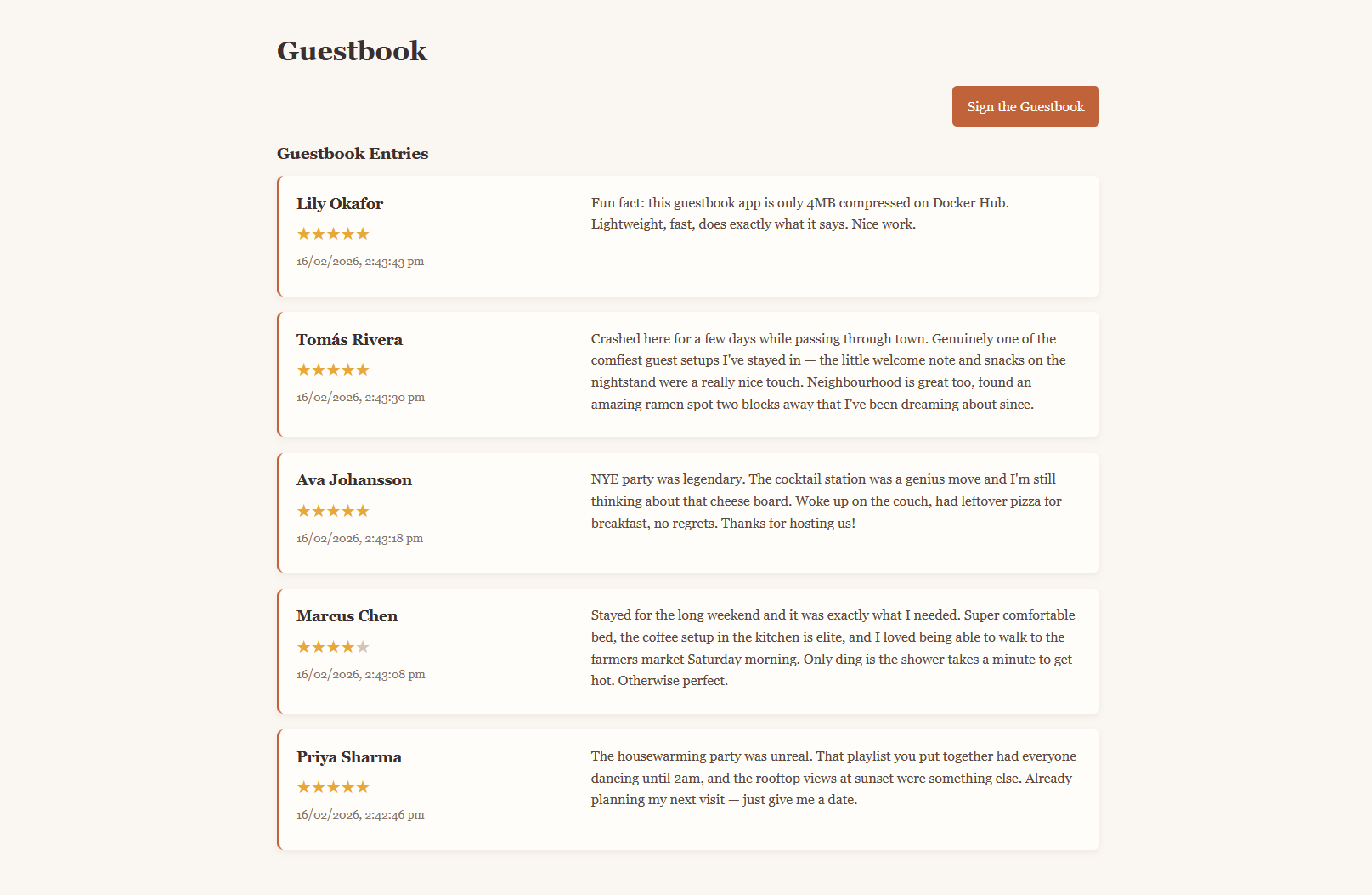
Here is the homepage of tiny-guestbook:
Quick overview of the app (backend)
Rust backend using Actix-web, SQLite via sqlx, and vanilla HTML/CSS/JS for the frontend. Four source files:
main.rs- Actix server setup and route mountinghandlers.rs- API request handlersdb.rs- SQLite pool, migrations, queriesmodels.rs- structs with serde/sqlx derives
The server entry point defines all the available routes on the server:
#[actix_web::main]
async fn main() -> std::io::Result<()> {
    let pool = db::init_db().await;

    HttpServer::new(move || {
        App::new()
            .app_data(web::Data::new(pool.clone()))
            .route("/api/sign", web::post().to(handlers::sign_guestbook))
            .route("/api/entries", web::get().to(handlers::get_guestbook_entries))
            .route("/api/entry", web::get().to(handlers::get_entry_by_id))
            .route("/api/entry", web::delete().to(handlers::delete_entry_by_id))
            .service(sign)
            .service(Files::new("/static", "./static"))
            .service(Files::new("/", "./static").index_file("index.html"))
    })
    .bind(("0.0.0.0", 8080))?
    .run()
    .await
}
POST /api/signfor adding to the guestbookGET /api/entriesfor getting the entries in the guestbookGET /api/entryfor getting a specific entryDELETE /api/entryfor deleting that inappropriate entry your friend uses to deface your guestbook
Data is persisted with SQLite which keeps things simple, sqlx runs embedded migrations at startup to create the one and only table required by the app.
Quick overview of the app (frontend)
The frontend is served by the server using actix_files, it is just vanilla HTML, CSS, and JS. One page for looking at the entries and another for adding a new one.
The Dockerfile
The Dockerfile is the most interesting part of this project, I wanted to focus on having a small final image and also needed to support AMD64 and ARM architectures. Builds are automated with GitHub Actions using Docker Buildx, this provides a TARGETPLATFORM environment variable which we can use to specify the target for compilation at build time.
The build stage looks as follows:
FROM rust:1 AS builder
WORKDIR /usr/src/app
RUN apt-get update && apt-get install -y musl-tools
RUN rustup target add x86_64-unknown-linux-musl aarch64-unknown-linux-musl
COPY . .
ARG TARGETPLATFORM
RUN if [ -z "$TARGETPLATFORM" ]; then \
ARCH=$(uname -m); \
if [ "$ARCH" = "x86_64" ]; then \
RUST_TARGET=x86_64-unknown-linux-musl; \
elif [ "$ARCH" = "aarch64" ]; then \
RUST_TARGET=aarch64-unknown-linux-musl; \
else \
echo "Unsupported architecture: $ARCH"; exit 1; \
fi; \
else \
if [ "$TARGETPLATFORM" = "linux/amd64" ]; then \
RUST_TARGET=x86_64-unknown-linux-musl; \
elif [ "$TARGETPLATFORM" = "linux/arm64" ]; then \
RUST_TARGET=aarch64-unknown-linux-musl; \
else \
echo "Unsupported TARGETPLATFORM: $TARGETPLATFORM"; exit 1; \
fi; \
fi && \
echo "Building Rust target: $RUST_TARGET" && \
cargo build --release --target $RUST_TARGET
FROM scratch
WORKDIR /app
COPY /usr/src/app/target/*/release/guestbook .
COPY static/ static/
ENTRYPOINT ["./guestbook"]Static linking with musl
The build targets x86_64-unknown-linux-musl or aarch64-unknown-linux-musl instead of the default glibc targets. musl produces a fully static binary, there is no dynamic linker and no shared library dependencies. The resulting binary makes syscalls directly against the kernel and needs nothing else at runtime.
This is what makes FROM scratch possible. Scratch is an empty filesystem. If the binary had any dynamic dependencies, it would fail on startup.
The musl-tools apt package provides the cross-compilation toolchain that cargo needs for the musl targets.
Multi-arch via TARGETPLATFORM
Docker Buildx sets the TARGETPLATFORM build arg automatically when building with --platform. The shell block maps Docker's platform strings to Rust target triples:
| Docker platform | Rust target |
|---|---|
linux/amd64 | x86_64-unknown-linux-musl |
linux/arm64 | aarch64-unknown-linux-musl |
There's a fallback for plain docker build without Buildx - if TARGETPLATFORM isn't set, it uses uname -m to detect the host architecture. So the same Dockerfile works for both local builds and CI multi-arch builds.
The scratch stage
FROM scratch
WORKDIR /app
COPY /usr/src/app/target/*/release/guestbook .
COPY static/ static/
ENTRYPOINT ["./guestbook"]The final image contains only what it needs: the static binary and the static/ directory with the HTML/CSS/JS frontend. Nothing else. You can't even docker exec into it because there's no shell.
The glob in target/*/release/guestbook avoids hardcoding the target triple. Whether the builder compiled for x86_64-unknown-linux-musl or aarch64-unknown-linux-musl, the wildcard matches the right path.
Compressed on Docker Hub, the whole image is about 4MB.
CI pipeline
The GitHub Actions workflow handles multi-arch builds on push to version tags:
- name: Set up QEMU (multi-arch build support)
  uses: docker/setup-qemu-action@v3

- name: Set up Docker Buildx
  uses: docker/setup-buildx-action@v3

- name: Build & Push Docker image
  uses: docker/build-push-action@v5
  with:
    platforms: linux/amd64,linux/arm64
    tags: |
      ${{ secrets.DOCKER_USERNAME }}/tiny-guestbook:latest
      ${{ secrets.DOCKER_USERNAME }}/tiny-guestbook:${{ env.VERSION }}
QEMU provides emulation so the x86 GitHub runner can build ARM64 binaries. Buildx runs the Dockerfile once per platform and publishes a multi-arch manifest. docker pull on any supported machine gets the correct binary automatically.
Pushing a tag like 0.1.1 triggers the workflow and publishes both :latest and :0.1.1.
Running it
I like docker compose for all my homelab stuff, the repo provides a docker compose to use:
services:
  guestbook:
    image: owenelliottdev/tiny-guestbook:latest
    ports:
      - '8080:8080'
    volumes:
      - ./data:/app/data
    restart: unless-stopped
Map the data/ volume if you want entries to persist across restarts.
Check out the code here if you want to run it on your own homelab!